Remote — Europe & International Structural BIM & detailing studio

Structural BIM Modeling & Steel / RC Detailing for International Projects

LOD 300–400 coordination, fabrication-ready structural documentation, and Python-based CAD/IFC automation delivered to Eurocode, AISC, and ISO 19650 standards.

Email-based scoping · Moscow (UTC+3) · English, Turkish & Russian

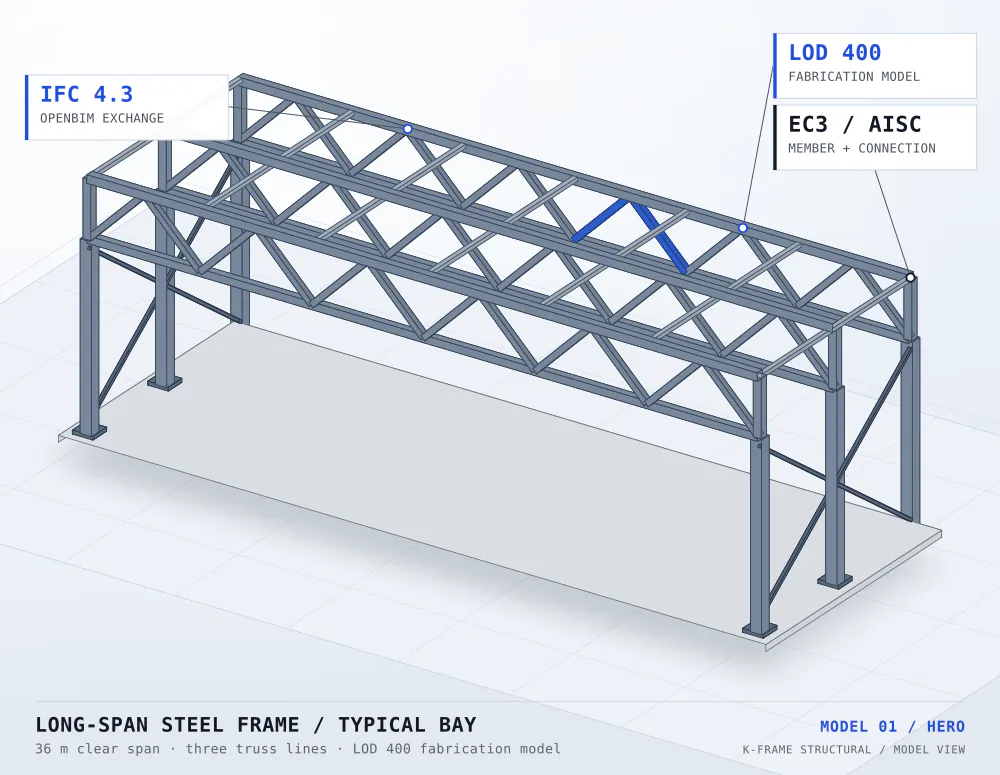
Shaded 3D model view of a 36-meter clear-span steel truss frame with columns, purlins, and bracing, annotated LOD 400, IFC 4.3, and EC3 / AISC.
Fig. 01 36 m clear-span truss, typical bay. Fabrication-level model issued at LOD 400.
Model development
LOD 300–400
Design codes
Eurocode / AISC / ACI
Model exchange
IFC / Revit / Tekla
Federation target
Zero-Clash Coordination

01 / Services

Engineering scope, issued as one coordinated package

Four connected capabilities cover the route from reference drawings to fabrication information. Each scope is fixed in writing before modeling starts, with named deliverables and review gates.

S-01

Structural BIM Modeling LOD 300–400

Full-discipline concrete and steel models with federation and automated clash resolution, built for coordinated design review and downstream detailing.

  • Federated architectural and structural models
  • Clash batches, tolerance rules, and issue logs
  • Parameter, classification, and IFC export QA
S-02

Steel & RC Detailing

Connection design documentation, shop and assembly drawings, bar bending schedules, and material take-offs prepared for fabrication and site use.

  • Bolted and welded connection details
  • Shop, assembly, and erection drawing sets
  • Bar bending schedules, bolt lists, and BOM
S-03

2D CAD to 3D BIM Conversion

Legacy DWG documentation and scan-to-BIM structural skeletons rebuilt as parametric models, with every assumption recorded against the source drawing.

  • Drawing audit and information gap register
  • Parametric frame, slab, and foundation rebuild
  • Source-to-model deviation report
S-04

BIM & CAD Automation

Custom Python (IfcOpenShell) and API scripts for batch specification parsing, QA validation, and repetitive layout optimization across large model sets.

  • Batch IFC property and classification checks
  • Quantity extraction and BOM comparison
  • Repeatable QA reports with source identifiers

02 / Selected Projects

Four scopes, documented to issue standard

Anonymized case files from international commissions. Figures and tools are retained; client identities are withheld. Open a case for the delivered scope and coordination notes.

Filter by discipline

Showing 4 of 4 projects

Shaded 3D model view of a long-span logistics hub with welded steel trusses, roof purlins, and a portal opening.
Steel Case 01

Long-Span Industrial Logistics Hub

36 m clear-span welded trusses detailed for fabrication, with 1,420 t of structural steel modeled in Tekla Structures and exchanged as IFC 4.

Clear span
36 m
Steel
1,420 t
LOD
400
Shaded 3D model view of a 14-story reinforced concrete frame with floor slabs, perimeter columns, and a central core.
Concrete Case 02

Multi-Story Commercial RC Core & Frame

14-story cast-in-place frame with 18,500 m³ of concrete, modeled in Autodesk Revit and verified in Robot Structural Analysis at LOD 350.

Stories
14
Concrete
18,500 m³
LOD
350
Shaded 3D model view of a heavy steel mezzanine and overhead crane support frame with runway beams and bracing.
Steel Case 03

Modular Equipment Testing Facility Frame

Heavy-load steel mezzanine and overhead crane support frame, 680 t of steel, detailed for Eurocode 3 compliance with deflection verification.

Steel
680 t
Crane
Overhead
Code
EC3
Shaded 3D model view of a three-story IFC model with highlighted members, data nodes, and a scan plane.
Automation Case 04

Automated IFC Specification & QA Pipeline

A Python and IfcOpenShell toolchain that reduced manual steel and concrete bill-of-quantities verification time by 70% across multi-discipline models.

Stack
Python
Schema
IFC 4.3
Time saved
70%

03 / Software Stack & Design Codes

Tools and codes recorded before the first model

Toolchain and compliance basis are agreed in the project execution plan. Native formats stay available; open formats are validated before every issue.

Software

Authoring, coordination, analysis, and automation tools used on issued scopes.

  • Autodesk Revit Concrete and steel authoring, reinforcement, documentation RVT / IFC
  • Tekla Structures Steel detailing, connections, fabrication drawings IFC / DWG
  • AutoCAD / BricsCAD 2D documentation and legacy drawing conversion DWG / DXF
  • Navisworks Manage Federation, clash detection, and model review NWD / NWF
  • Robot Structural Analysis Global analysis and member verification Model link
  • Python / IfcOpenShell Batch IFC parsing, QA rules, quantity extraction IFC / CSV / JSON

Design codes

Code, scope, and exchange schema applied to the relevant deliverable.

  • Eurocode 2 & 3 EN 1992 / EN 1993 basis for concrete and steel RC / steel
  • AISC 360 US steel member and connection specification Steel
  • ACI 318 US concrete design and reinforcement detailing RC
  • ISO 19650 Information management, naming, and delivery All scopes
  • IFC 2x3 / 4.3 OpenBIM exchange and schema validation Federation

04 / Delivery Workflow

From reference set to signed handover

A four-stage sequence with a defined output at every gate. Review points are scheduled up front, so model changes do not reopen closed decisions.

  1. 01Inputs

    Scope & Reference Inputs

    Review drawings, IFC files, design code, LOD target, and schedule. Confirm exclusions and information gaps before modeling begins.

    Output Scope note, input register, federated reference set.

  2. 02Model

    3D Modeling & Clash Check

    Author structural models, federate with other disciplines, run clash batches, and resolve clashes against agreed tolerances.

    Output Coordinated model, clash report, issue log.

  3. 03Detail

    Detailing & Schedules

    Develop connections and reinforcement, then issue shop and assembly drawings, bar bending schedules, and material take-offs.

    Output Fabrication drawings, BBS/BOM, QA checklist.

  4. 04Issue

    IFC / DWG Handover

    Validate exports, naming, classification, and quantities. Package native and open formats with a transfer index and release note.

    Output IFC/DWG package, QA report, handover index.

05 / Contact

Send the drawings, code, LOD, and timeline. Get a scoped modeling plan.

Email is the intake channel. Include the reference set or a link to it, the target design code, the required LOD, and the dates you are working to. No files are uploaded through this page.

Operating timezone
Moscow (UTC+3) — Remote, Europe & International
Working languages
English / Turkish / Russian
Engagement
Project-based scopes and ongoing modeling support

INQUIRY / CHECKLIST

Scope checklist

Use this list to prepare the email. Ticking an item only changes this page; nothing is submitted.

Items to include in the inquiry email

Attachments travel through your own mail provider. This static page stores no files and sets no cookies.

Request Scope Review

Case file

Case detail

Scope delivered

    Coordination notes

    Standards applied